
Free switch (fs) is basically open source software defined technology stack that supports the following endpoints and is a class 5 soft switch , IVR platform and high quality conference resource and supports principally SIP but also Google talk and Skype
Module Types FS
The following modules comprise the FS IP PBX
- Endpoint for talking to VOIP , PSTN , Google Talk , Skype etc
- Application there are hundreds of application modules for conferencing , voicemail , IVR that are contained in the tools module
- Dialplan responsible for routing calls based on call context information such as caller ID , the default dialplan module is in the XML dialplan
- Directory provides logins and configurations that users can register with FS
- Codecs that are used for the encoding of media streams
- File Formats play audio files whose common common formats are supported by the sndfiles module which is included by default
- Loggers records log messages such as log file.xml_cdr
- Languages languages that are supported for scripting javascript is supported
Configuration files in FS
All configuration files are written in XML the default configuration that comes with the virtual machine is located in /etc/freeswitch
One of the first differences that is evident between Cisco unified call manager and FS is that FS has inbuilt support for SMS under the chatplan whereas in the Cisco framework you would have to provision load of middle ware and somewhere would be a node.js app but thats a story for another day
How to register Yealink T21 to FS
Head over to the default directory it will look like this one below , these are all the extensions in the default context which is like the CUCM internal partition
root@freeswitch-vm:/etc/freeswitch/directory/default#
root@freeswitch-vm:/etc/freeswitch/directory/default# ls
1000.xml 1002.xml 1004.xml 1006.xml 1008.xml 1010.xml 1012.xml 1014.xml 1016.xml 1018.xml brian.xml example.com.xml
1001.xml 1003.xml 1005.xml 1007.xml 1009.xml 1011.xml 1013.xml 1015.xml 1017.xml 1019.xml default.xml skinny-example.xml
root@freeswitch-vm:/etc/freeswitch/directory/default#
lets say we want to register under 1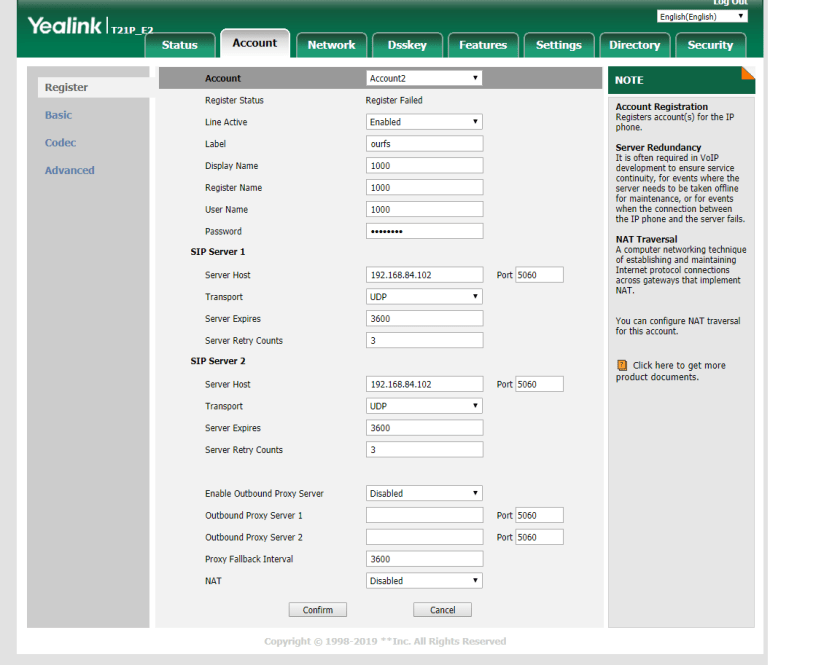
so nano 1000.xml and make the config line up with above xml
so it looks like this
<user id=”1000″>
<params>
<param name=”1000″ value=”$${default_password}”/> (we set this in the yealink)
<param name=”vm-password” value=”1000″/>
</params>
<variables>
<variable name=”toll_allow” value=”domestic,international,local”/>
<variable name=”accountcode” value=”1000″/>
<variable name=”user_context” value=”default”/>
<variable name=”effective_caller_id_name” value=”Extension 1000″/>
<variable name=”effective_caller_id_number” value=”1000″/>
<variable name=”outbound_caller_id_name” value=”$${outbound_caller_name}”/>
<variable name=”outbound_caller_id_number” value=”$${outbound_caller_id}”/>
<variable name=”callgroup” value=”techsupport”/>
</variables>
</user>
</include>
but will end up like this
<include>
<user id=”1000″>
<params>
<param name=”1000″ value=”1000″/>
<param name=”vm-password” value=”1000″/>
</params>
<variables>
<variable name=”toll_allow” value=”domestic,international,local”/>
<variable name=”accountcode” value=”1000″/>
<variable name=”user_context” value=”default”/>
<variable name=”effective_caller_id_name” value=”Extension 1000″/>
<variable name=”effective_caller_id_number” value=”1000″/>
<variable name=”outbound_caller_id_name” value=”$${outbound_caller_name}”$
<variable name=”outbound_caller_id_number” value=”$${outbound_caller_id}”$
<variable name=”callgroup” value=”techsupport”/>
</variables>
</user>
</include>
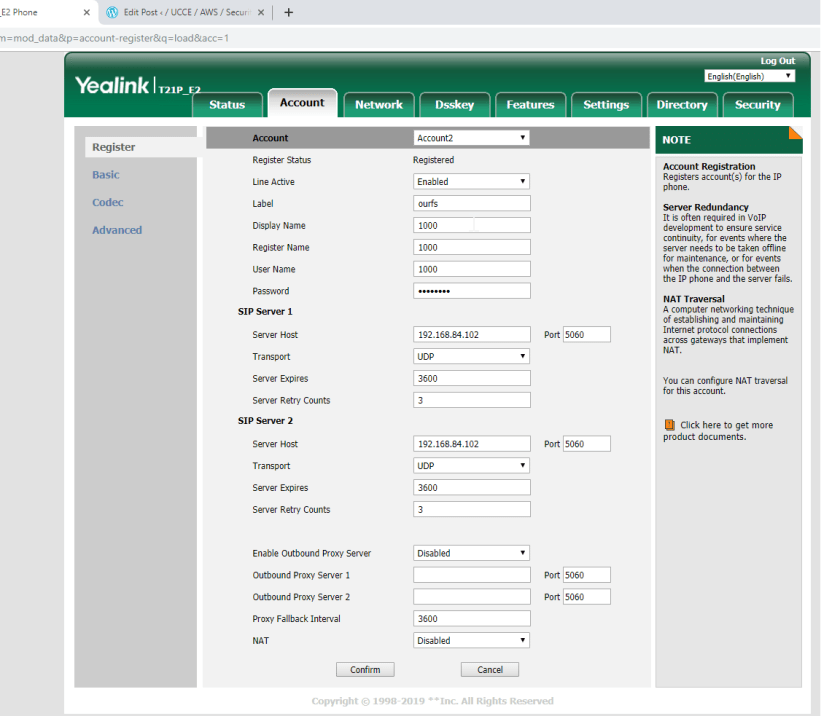
then it will register to the fs
The most important concept in FS is ………
the basic construct is a dialplan which is simply a list of actions which is controlled by the digits dialled , a dialplan can be broken into contexts where each context is a group of extensions , each of which contains specific actions can be performed on the call
the dialplan processor uses regular expressions which is a pattern matching system to determine which extensions and actions to execute
<extension name=”example”>
<condition field= “destination_number” expression =”^(10\d\d\)$”>
<action application =”log” data=”INFO dialed number is [$1]”/>
This captures the digits dialed and matches them against 10\d\d so this is a range 1000 to 1099 , so if a user dials 1050 this would execute the application called log and print out the digits dialed to the screen , the value $1 would be interpolated or expanded
FS has 3 main contexts
- default
- public
- features
The default context
This can be though of as the internal as it services users who are directly connected to FS
There are some typical PABX type extensions contained within conf/dialplan/default.xml the local extension does many things
- routes calls between internal users
- sends calls to the destination users voicemail on a no answer condition
- enables in call features with bind_meta_app
- updates the local calls data base
The local extension
<extension name=”Local_Extension”>
<condition field=”destination_number” expression=”^(10[01][0-9])$”>
<action application=”export” data=”dialed_extension=$1″/>
<!– bind_meta_app can have these args <key> [a|b|ab] [a|b|o|s] <app> –>
<action application=”bind_meta_app” data=”1 b s execute_extension::dx XML features”/>
<action application=”bind_meta_app” data=”2 b s record_session::$${recordings_dir}/${caller_id_number}.${strftime(%Y-%m-%d-%H-%M-%S)}.wav”/>
<action application=”bind_meta_app” data=”3 b s execute_extension::cf XML features”/>
<action application=”bind_meta_app” data=”4 b s execute_extension::att_xfer XML features”/>
<action application=”set” data=”ringback=${us-ring}”/>
<action application=”set” data=”transfer_ringback=$${hold_music}”/>
<action application=”set” data=”call_timeout=30″/>
<!– <action application=”set” data=”sip_exclude_contact=${network_addr}”/> –>
<action application=”set” data=”hangup_after_bridge=true”/>
<!–<action application=”set” data=”continue_on_fail=NORMAL_TEMPORARY_FAILURE,USER_BUSY,NO_ANSWER,TIMEOUT,NO_ROUTE_DESTINATION”/> –>
<action application=”set” data=”continue_on_fail=true”/>
<action application=”hash” data=”insert/${domain_name}-call_return/${dialed_extension}/${caller_id_number}”/>
<action application=”hash” data=”insert/${domain_name}-last_dial_ext/${dialed_extension}/${uuid}”/>
<action application=”set” data=”called_party_callgroup=${user_data(${dialed_extension}@${domain_name} var callgroup)}”/>
<action application=”hash” data=”insert/${domain_name}-last_dial_ext/${called_party_callgroup}/${uuid}”/>
<action application=”hash” data=”insert/${domain_name}-last_dial_ext/global/${uuid}”/>
<!–<action application=”export” data=”nolocal:rtp_secure_media=${user_data(${dialed_extension}@${domain_name} var rtp_secure_media)}”/>–>
<action application=”hash” data=”insert/${domain_name}-last_dial/${called_party_callgroup}/${uuid}”/>
<action application=”bridge” data=”user/${dialed_extension}@${domain_name}”/>
<action application=”answer”/>
<action application=”sleep” data=”1000″/>
<action application=”bridge” data=”loopback/app=voicemail:default ${domain_name} ${dialed_extension}”/>
</condition>
</extension>
<extension name=”Local_Extension_Skinny”>
<condition field=”destination_number” expression=”^(11[01][0-9])$”>
<action application=”set” data=”dialed_extension=$1″/>
<action application=”export” data=”dialed_extension=$1″/>
<action application=”set” data=”call_timeout=30″/>
<action application=”set” data=”hangup_after_bridge=true”/>
<action application=”set” data=”continue_on_fail=true”/>
<action application=”bridge” data=”skinny/internal/${destination_number}”/>
<action application=”answer”/>
<action application=”sleep” data=”1000″/>
<action application=”bridge” data=”loopback/app=voicemail:default ${domain_name} ${dialed_extension}”/>
</condition>
</extension>
 / UCCE / AWS / azure/Security / IP-PBX