

We going to use PowerShell to move users – but there’s quite a bit to consider when migrating, key to which is understanding the driver of the cloud adoption
pro list cloud adoption
- Cost – companies can make a considerable savings in TCO , this is a big driver , migration paths are often designed to end when the next big contract is due to be signed for the vendor – though sometime especially when you analyse the costs it can be that the client is paying more – cloud is not cheap and you have to be wary of how things are billed
- New functionality – the pandemic has only served to poor gasoline on the fire that was pre-pandemic cloud adoption ,the web stack is literally the coal face WebRTC and just the way teams does that job of searching and allowing the user to become his own web 2.0 knowledge base by searching through meetings and screen shares and documents all through the same interface means that the way your data is stored is more organic and of course not tied into your laptop, companies with a high emo intel understand that teams helps its users by allowing them to find their own answers which is only empowered by the way teams collaborates with the users
Cons list Cloud adoption
- Teams URI need to have a unique e164 number pattern – this means that every number on teams is uniquely dialable , that might not sound like a limitation but back in the day of Enterprise PBX deployment you could have an internal number that wasn’t part of the dial plan but that presented an external phone number mask that was contained within the dial plan to the trunk which would be accepted by the provider- so to put this right ? you must upgrade your DDI lines to remove these internal partitions -though these can be difficult to detect
- There are plenty of enterprise functionality which may not map in the cloud such as functionality in the analogue space, forwarding calls direct from the AA
- because of the URI requirement this means that PBX 4 digit dialing or any custom schemes that the user were used to – will no longer work
- in the MS world a line URI must have an AD account for it to work, so lines that don’t have associated users or AD accounts can’t be migrated
Pre migration check list
Interworking from the cloud perspective is realised by number plans and proxy sets, which select where you want the call to go
Interworking from the IP PBX perspective it is realised by number plans that use SIP trunking to the SBC and MS integration
Hybrid platforms mean that the act of migration becomes moving the line from enterprise to cloud and then cleaning the PBX
A PBX DDI and a Cloud telephony URI can’t exist in the same systems, so if you got a DDI line of 1111 and a Line URI of 1111 the architecture can’t route the call
The pre migration test list
- Check the site hybrid functionality – make inbound and outbound calls via cisco and make inbound and outbound calls via teams, test call forwards in both systems any analogue dependencies and IVR functionality don’t make any assumptions it will help to understand the dial plan
- check the PRI count how are the numbers delivered into the architecture
- Dump the IP PBX dial plan into excel – capture MAC addresses if you need to reverse any lines out of the migration – don’t delete what you don’t want to hide it
- Dump the corporate or replicated AD into Azure AD and get it into a form that doesn’t kill any LDAP replication and put it as a tab in the worksheet
- Hide elements you can’t migrate because of the functionality for teams the main ones tend to be phones in kitchens because chef doesn’t own a computer etc
- make sure that we a number is not internal for example, check to see if the extension fits the dial plan – test ones you think are internal
- check that the prefix groups in Audiocodes routing manager match the PBX ranges to migrate, this can also help detect internal extensions
- track shared lines in the PBX
- build your teams spreadsheet incrementally by hand which you will use to PowerShell to the cloud
Direct Media and Local media Optimisation
Direct media is where an e1 is terminated in an SBC that the enterprise manages. LMO is streaming media direct to an internal interface of an SBC, so you don’t have to stream over the internet. the following deployment topologies build the signaling and, media paths so you can build to understanding LMO
This should be in its own blog but i am going to attach it here, its key to understand the flows
Teams’ client talks to team’s client signalling
In this scenario the REST protocol signals the teams Microsoft cloud

teams to team’s client media
Its down to ICE to handle the media fixup
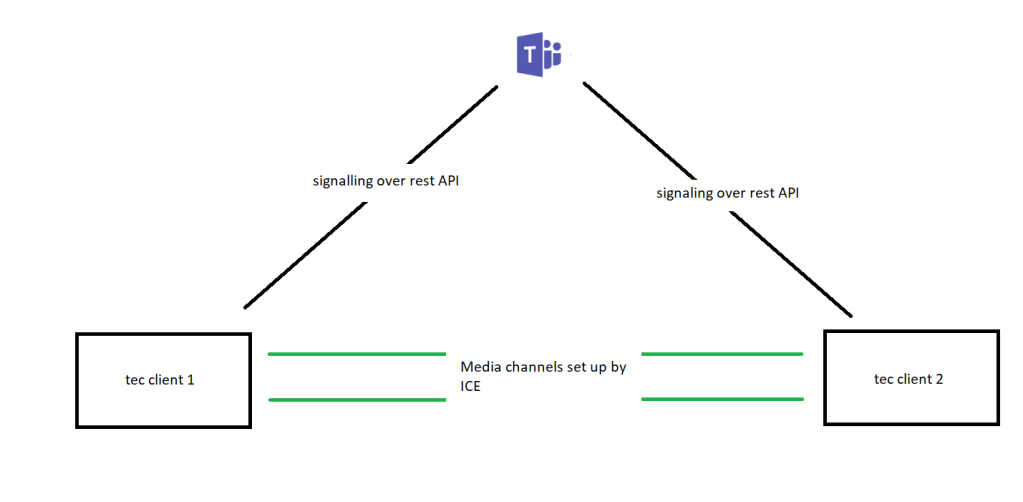
It’s the firewall and ICE’s job is to get the media in the best way possible between clients and it may use functions within the Office 365 network such as transport relays (media processors) if there is no direct path
Teams’ client to SBC signalling
endpoint generates the rest request and teams converts to an SIP invite and sends to the SBC
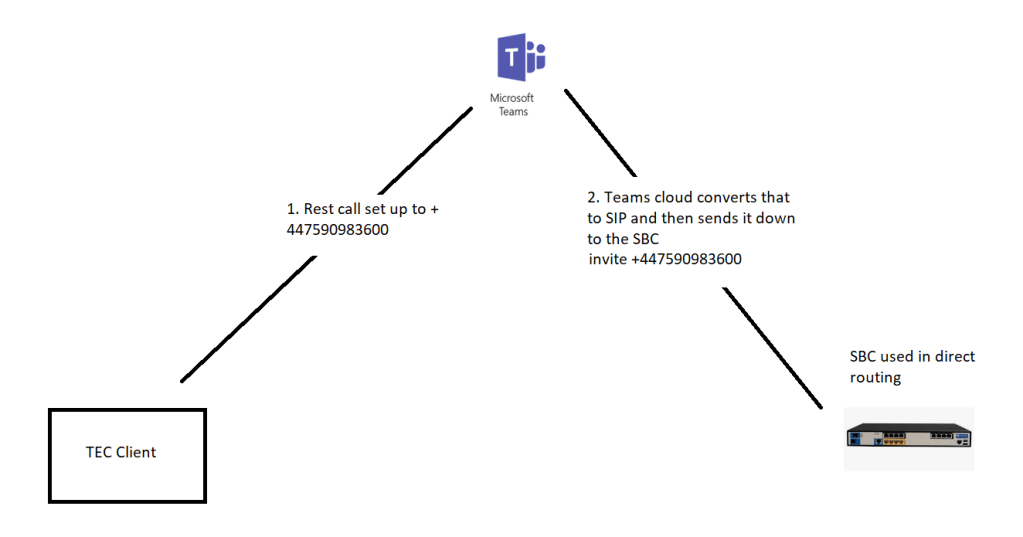
TEC to SBC media path without bypass
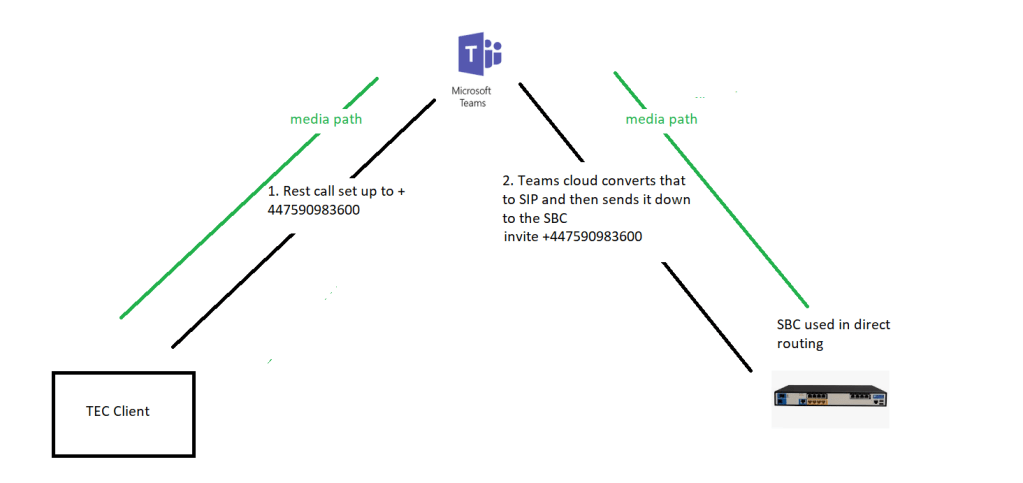
typically, the media can go through teams, but that isn’t the optimal path which would be between the client and the SBC

it’s quicker to go directly from the client to the SBC or centre media directly from the card to the SBC so in this case what we can do is enable something called media bypass now we’d pass bypass came out about a year ago it was just to basically a tick box in the configuration of the SBC you just said turn on media bypass and then teams will try to set up the call so the media will go directly from the client and straight across to the SBC
Media uses Silk codec ICE carried this media as well (Opus has been deprecated)
Client external to the SBC without media bypass
Without media bypass the signalling and media go from team’s client ot the SBC just like the TEC to SBC path

Client external to SBC with media bypass

client local to SBC without media bypass (m800 with PRI )
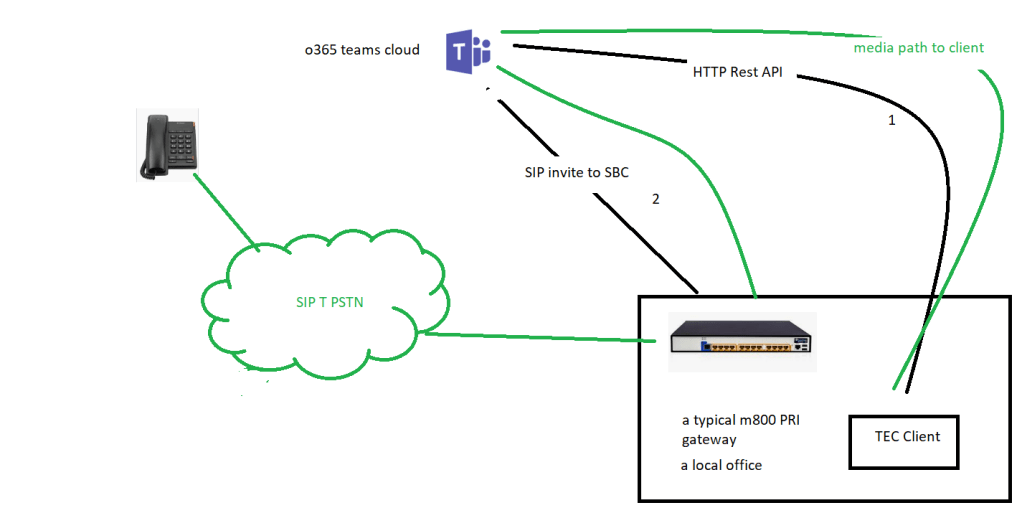
this stresses the firewall since we can see we are proxying through the client, also if the client is on the same LAN segment as the gateway the traffic is not optimal
Client local to SBC with media bypass (m800 with PRI)
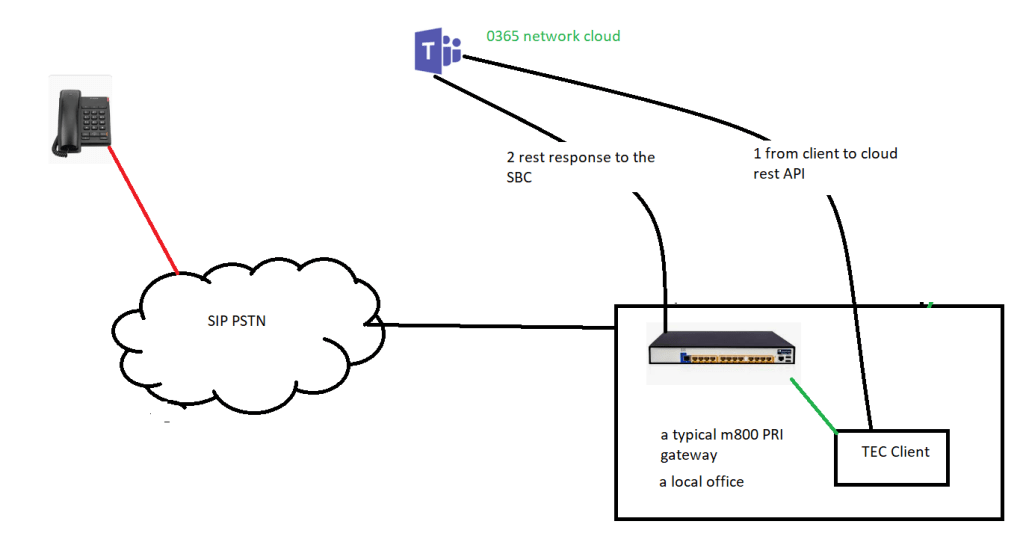
you would hope that with media bypass the client would stream media direct to the SBC
but one of the limitations of ICE lite was that the SBC could only have one IP address which in this case is external facing toward the PRI interface
this meant that the media had to exit and re-enter the firewall
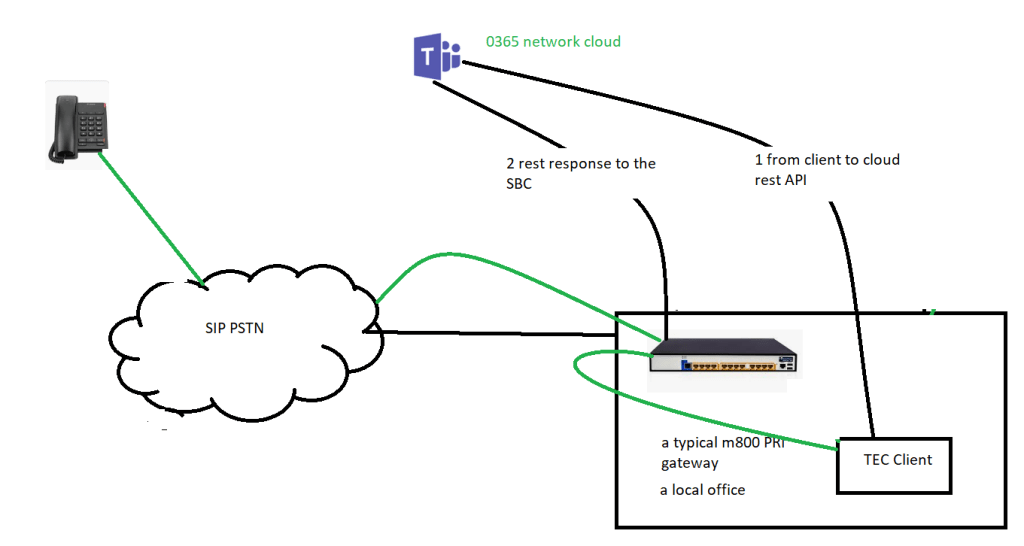
Local media optimisation solves this
it’s an enhanced media bypass, it uses Lis and LBR data to have location information
new sip headers include information about the user location
“external” or “internal ” in terms of the corporate network
this gives us smart call handling with more flexible topologies
you can still set up media bypass without LMO
prerequisite for LMO
configure sites and networks in teams using PowerShell new-CsTenantNetworkSubnet to define network subnets and assign them to network sites. Each internal subnet may only be associated with one site. Tenant network subnet is used for Location Based Routing.
New-CsTenantNetworkSubnet [-Tenant <System.Guid>] [-Description <String>] -NetworkSiteID <String> -MaskBits <Int32> [-Identity] <XdsGlobalRelativeIdentity> [-InMemory] [-Force] [-WhatIf] [-Confirm] [<CommonParameters>]
for example New-CsTenantNetworkSubnet -subnetID 192.168.0.1 -mask bits 24 -siteid london once its set up it can give you significant advantages
Local client use ‘internal’ header for media
client is sitting on the same LAN as the SBC
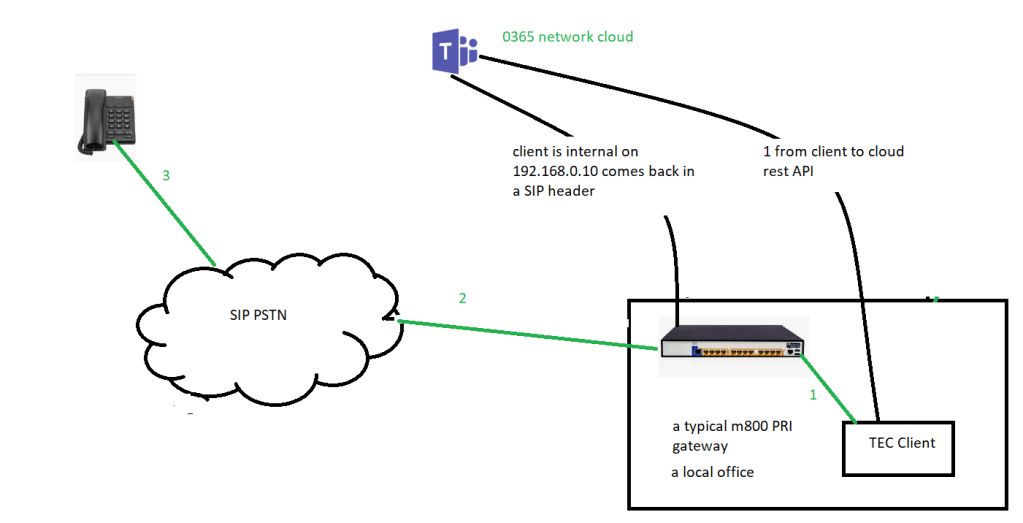
so, with the flag internal or external, site information and trusted Ip address, this means that the sbc can work with the client
the media flows through the SBC on an internal sip interface to the external SIP interface and out to the cloud
we are not constrained by ICE Lite which means we only have 1 ip for media, and we do not hairpin the firewall
client is external to the SBC with LMO

but codecs come to play here, the implication being that the SBC has got to transcode between G711 and SILK

but if you were an internal user you don’t have to transcode because the SBC will assign you to the G711 group and doesn’t have to transcode
Cisco hybrid site testing
find an IPC session and get it registered look in the PBX for test description and check inbound and outbound routing for the IPPBX side of the house and teams
check on the way the PRI or the SIP trunk is delivering calls into the site
so this site looks like a typical M800 / E1 gateway deployment with local media optimisation
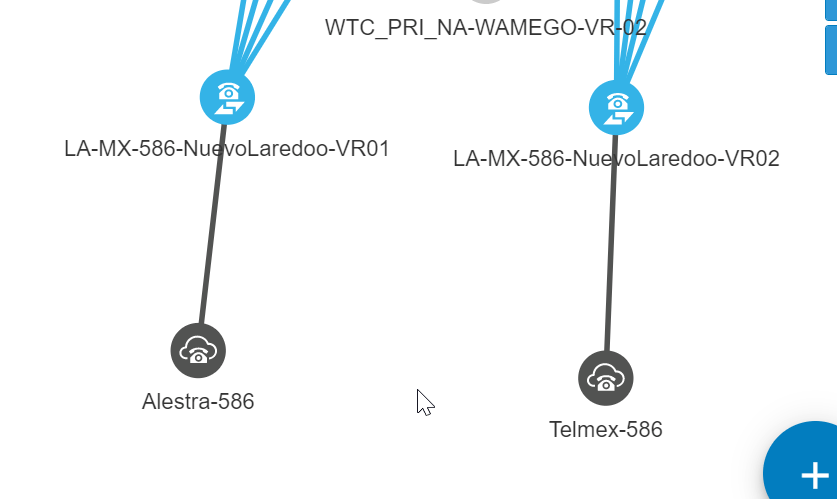
4 connections in this implementation of teams, to the regional SBC (x2) to the MS voice proxy for teams (x2)
Inbound PRI call Cisco in Nuevo Laredo
Let make a check that the PRI is delivered by syslog to the M800 GW on VR01
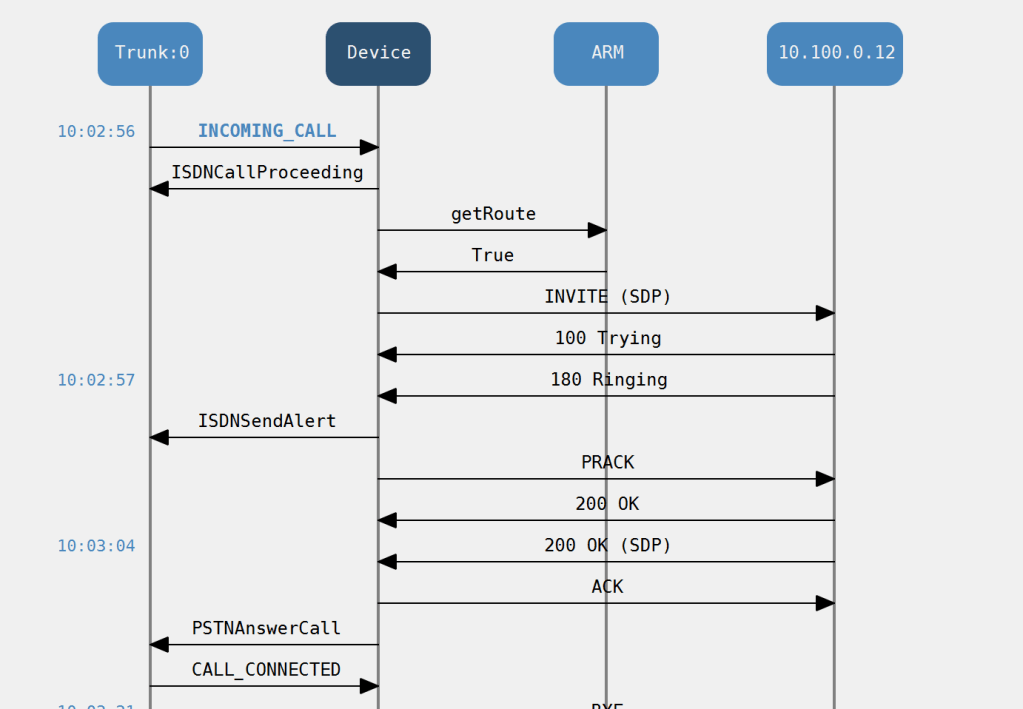
to save my mobile cost i took advantage of the following feature SIP that is you can use a diversion header for a unregistered device
PRI Voice testing in VOIP environments trick
Pick a legacy site with a E1 termination and create a custom route pattern to carry your number for example
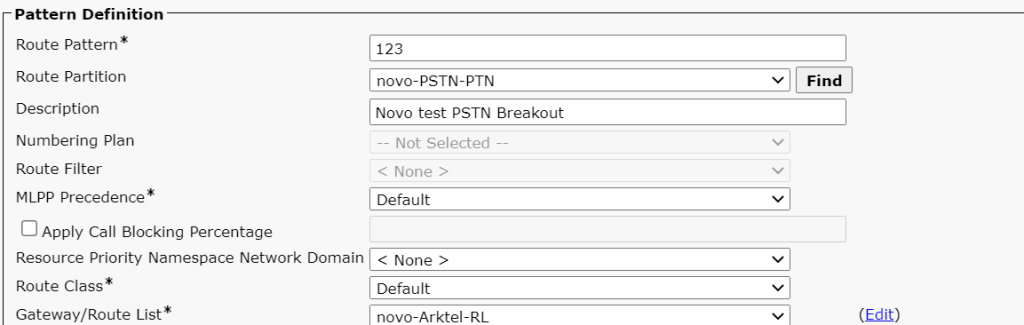
then use a called party transformation for the number you want to target via the e1 call
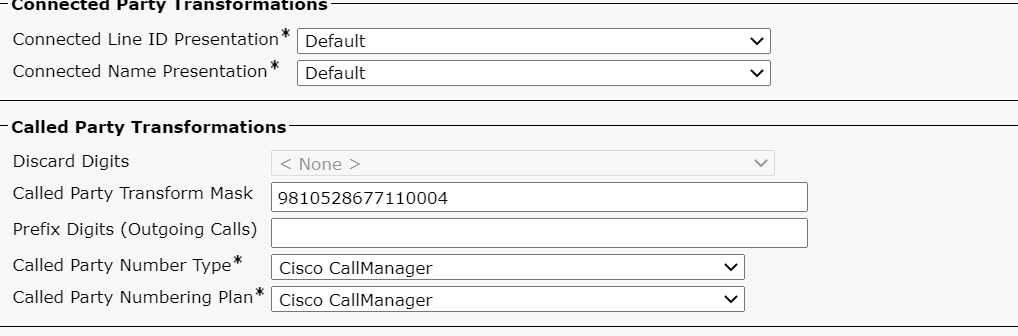
then you can choose any extension in the partition or associated CSS

but against the line

then all you have to do is exploit the VOIP dial plan by dialing the forwarded extension over VOIP dial plan
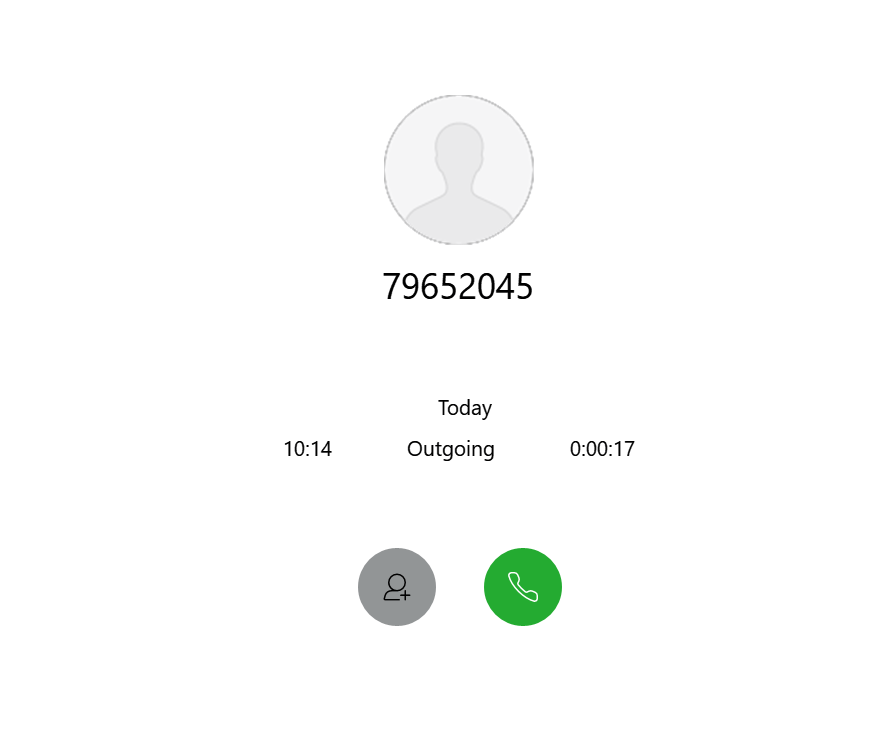
and then you would generate the trace above
Site PRI testing results
investigating the inbound call
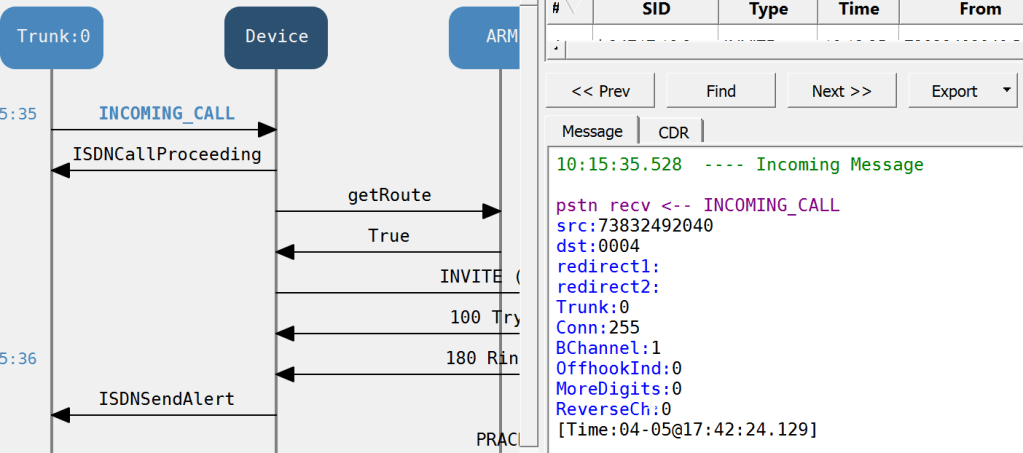
This PRI is sending 4 digits – can it send 9999 if you bust the dial plan you get to hear the local provider, but does it hit the gateway first? i don’t think so since if you scan the syslog for a CUCM event there is nothing
some interesting things to test would be the main number for the CTI which is on which in this case we can use to test dtmf as well
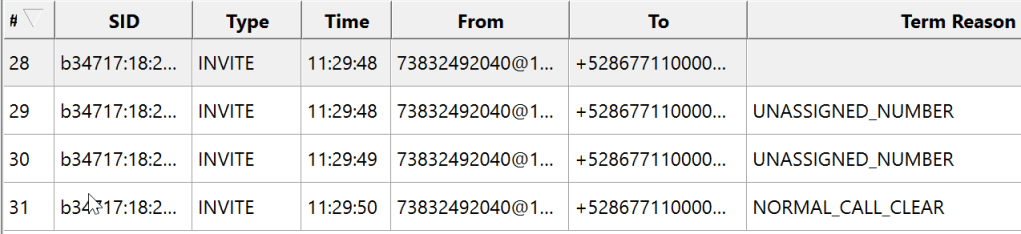
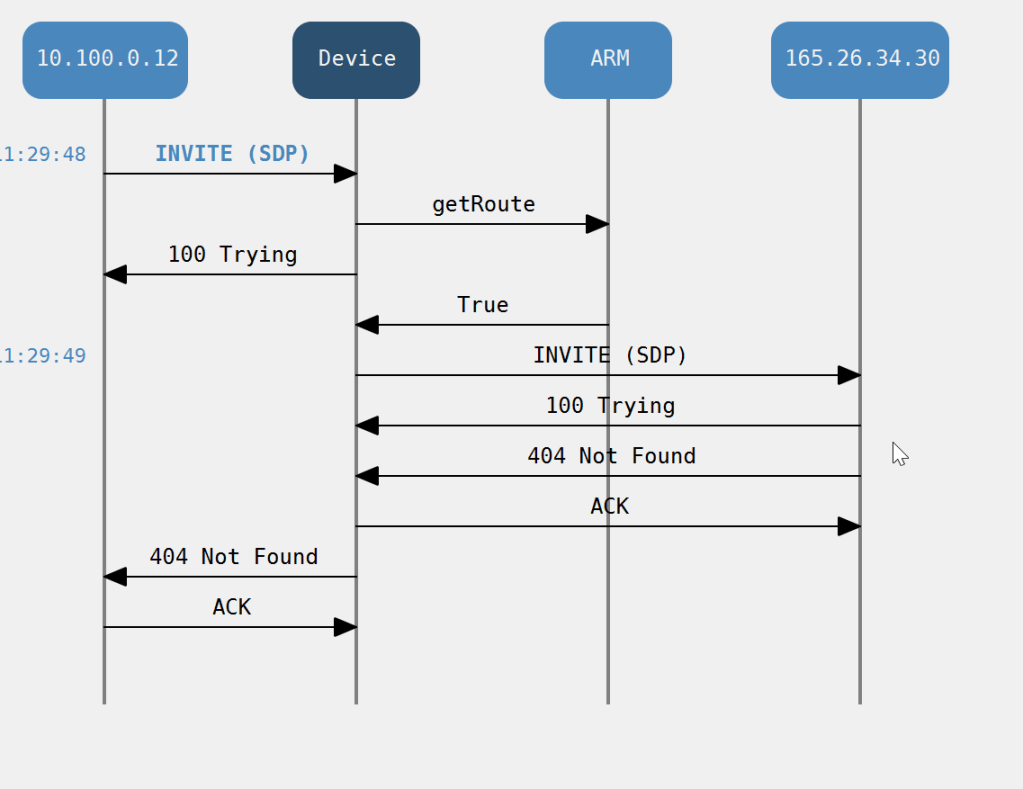
These extra events where to the Microsoft voice proxy HRD
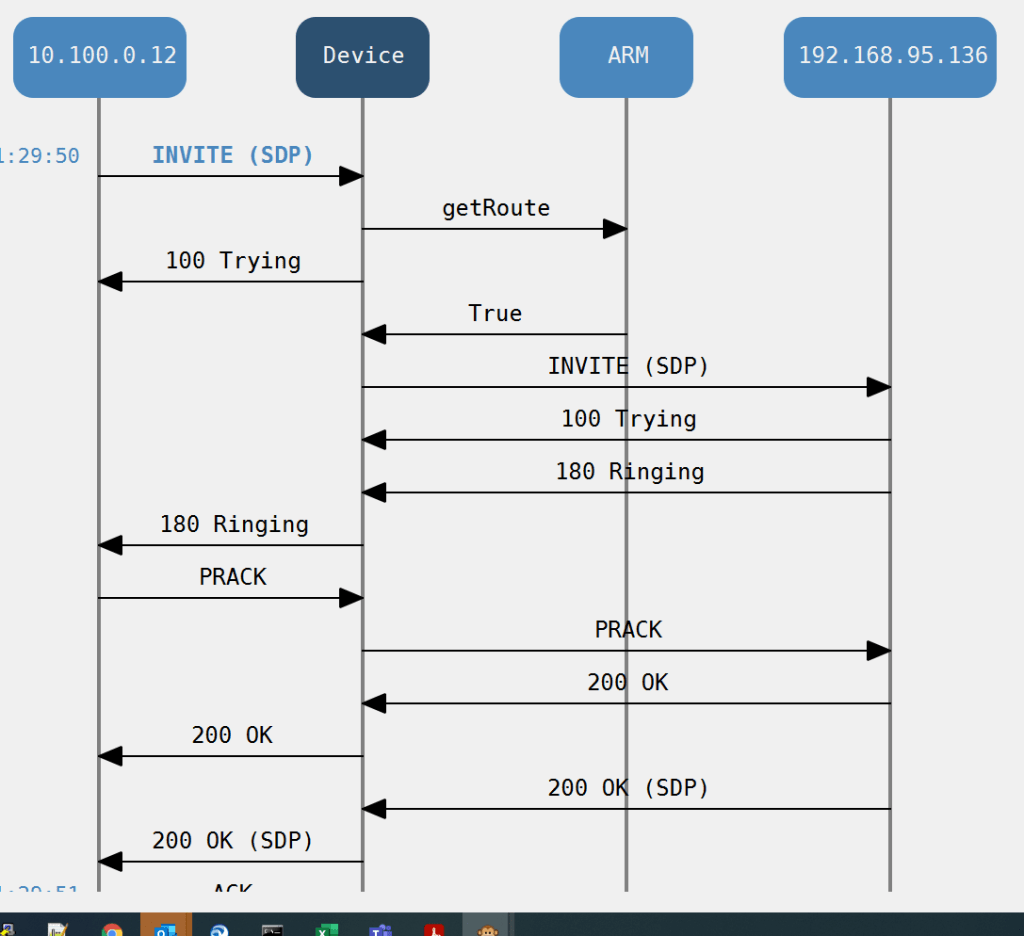
but then finally we end up on the Voicemail Unity call handler
so here’s another thing a forwarded line to the call centre

there was quite a lot of delay so i wonder if it’s hunting out the HRD again only 1 way to find out
Cisco Hybrid points
- The CLI is different for when you present the outbound call to the SBC vs a VOIP call to the enterprise
- The call tries the HRD SBC before routing to the local gateway for an inbound call
- if you blow the prefix group or trunk DDI the operator cuts in
- we can immediately start to build a map of numbers that we can’t migrate because of forwards
Cisco Enterprise AD teams Migration data
The act of migration from enterprise to cloud is an exercise in data manipulation, IP-PBX feature migration, power shell pipeline , Teams administration , IP PBX cleanup and then teams site verification
The three things you need to migrate a site
- The DDI lines to be migrated so they can be written as a line URI
- The data has to be Azure AD ready, specifically MS needs an email address for the domain of the DDI user which is used as a UPN
- A voice Policy
There are others but they are more about setting up tenants and cloud instances
Definitions
A User Principal Name (UPN) is an attribute that is an internet communication standard for user accounts. A UPN consists of a UPN prefix (the user account name) and a UPN suffix (a DNS domain name). The prefix joins the suffix using the “@” symbol. For example, [email protected]. A UPN must be unique among all security principal objects within a directory forest.
The line Uniform Resource Identifier (URI) must be specified using the E. 164 format and use the “TEL:” prefix.
A voice routing policy is a container for PSTN usage records. You create and manage voice routing policies by going to Voice > Voice routing policies in the Microsoft Teams admin center or by using Windows PowerShell. … Users will automatically get the global policy unless you create and assign a custom policy
Prefix Groups make routing management and Dial Plan management easier, more efficient, and more convenient for telephony network operators. The feature also makes it possible to import an existing customer’s Dial Plan into the ARM using the northbound REST API.
Every routing rule can have dozens of prefixes. Grouping prefixes and then associating groups with routing rules reduces visual complexity and allows for more effective management. Prefix Groups save operators from repeatedly having to add prefixes to rules.
Once defined, the Prefix Group comprising multiple prefixes is associated with a routing rule
for example, an enterprise has distributed offices, the following can be defined: If a caller calls from source prefix x, the call is sent from SBC 1; if a caller calls from source prefix 2, the call is sent from SBC 2.
To develop a customer-specific Dial Plan into an ARM Prefix Group, the REST API is available.
PBX dump
If the PBX has a web interface select copy and highlight and paste special into excel as plain text, you will end up with the below
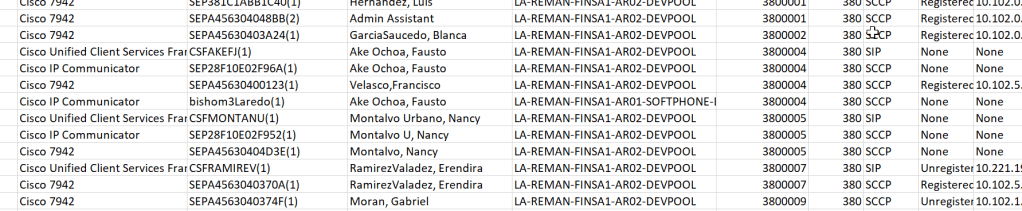
it also is worth understanding the translations that get us here from the PBX where the voice trunk number is normalised to the PBX dial plan
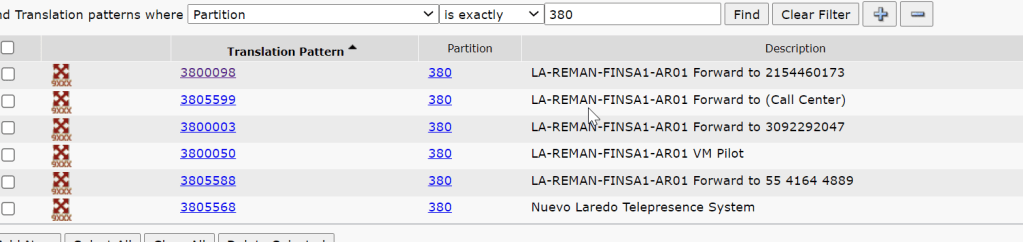
it’s also worth knowing how unity connection connects into the site
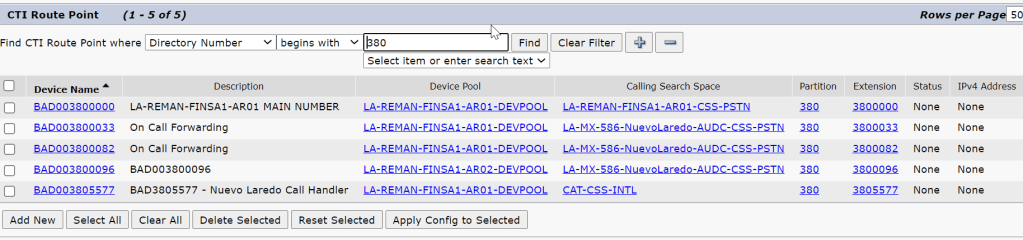
it’s worth putting this routing in the excel spreadsheet as different tabs
there must have been a translation pattern from when the e1 migrated so there must be a translation for a prefix group
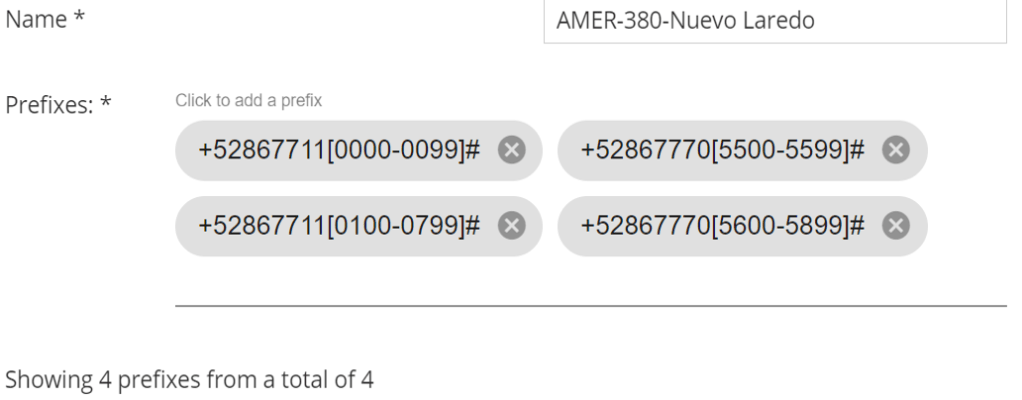
and look if we do that

change the query to check the other range

Please automate me Building the list
This is where we need to manipulate that data
Frustratingly there is no import excel type module like here by default and i dont want to risk my pipeline since i only have just got my MS to connect so i guess i need to build more into my excel or strip out the data to a file system
if you do all the descovery you will end up with something like this

| PBX dump | name phrase /DDI | string |
| PBX dedupe | DDI | string |
| CTI | DDI | |
| Translation profile | DDI range | string |
| Mask / Range | DDI by mask | string |
| Power BI | UPN ,UID | String |
| Clues / AD | DDI | String |
| Prefix | DDI range | string |
so to create an engine to work out the eligibility purely on the basis of a string search task -hmm
Putting the pre migration check list to the test in Sao Palo
lets fine tune this list and put it to the test , i have to finish of the migration of a site in Sao Palo – it did have two physical sites fronted by a cisco voice gateway with a PRI interface , but they then split the site in the cloud / teams and deployed an m800 gateway
checking the ARM network map Architecture

The site has mulitple voice connections
The site has multiple voice connections , jsut like where i had joberg with one SIP trunk and one PRI split accross the gateways
| la-br-1673-saopaulo-audc-vr01 | VIP VOIP PRI 1_la-br-1673-saopaulo-audc-vr01_VoIPPeer VIP VOIP PRI 2_la-br-1673-saopaulo-audc-vr01_VoIPPeer |
| la-br-1673-saopaulo-audc-vr02 | Embratel PRI_la-br-1673-saopaulo-audc-vr02_VoIPPeer |
Voice connections vr01
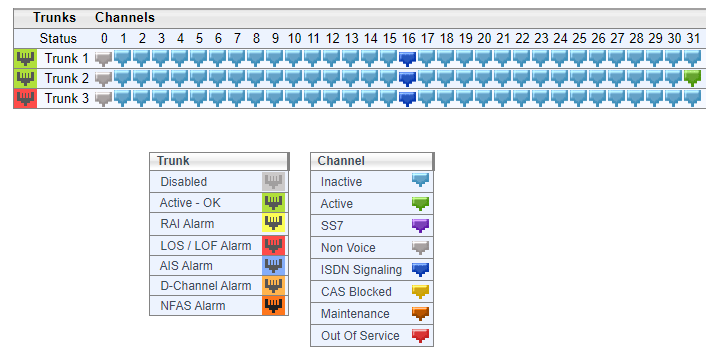
Voice connections vr02
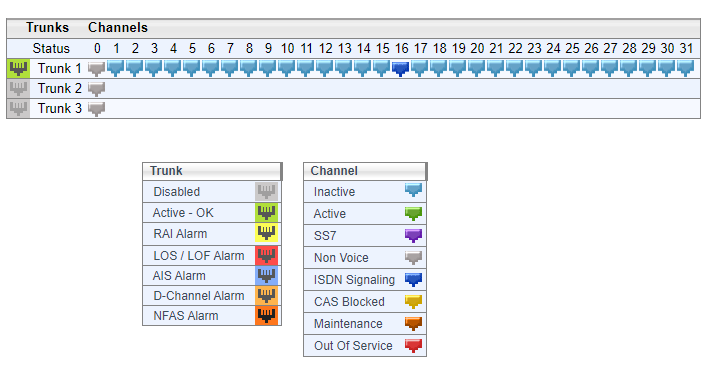
Logical configuration both sites
| Site ID | RNX | Nos Range | Voice Policy | Site IP subnets | PSTN usage gateway | hostname m800 | migrated status | |
| Sao Palo site 1 | 1673 | 425 | +551121090701 to +551121092298 | 1673-Sao Paulo-Users | yes | 1673-Sao Paulo-Usage | la-br-1673-saopaulo-audc-vr01 la-br-1673-saopaulo-audc-vr02 | Yes |
| Sao Palo site 2 | 373 | 424 | +551121092010 to +551121092117 | None | none | none | none | no |
Prefix groups in ARM

from the prefix group it looks like 3 ranges has been configured where some how we get to extension 2300 on a new addon to the range
+55112109[0700-0799]# for RNX 425 site 1673
+55112109[2000-2099]# for RNX 424 site 373
The financial prefix group looks like the best place to be since it covers all the ranges
Sao Palo Site 2 analysis
They have split the site logically but it share a continous range , but lumping 373 into 1673 might be a bit of a management head ache , but is possible , as log as thier is no duplicated extensions in the
so i am curious when it was on a cisco controlled PRI how did the cucm manage that ?
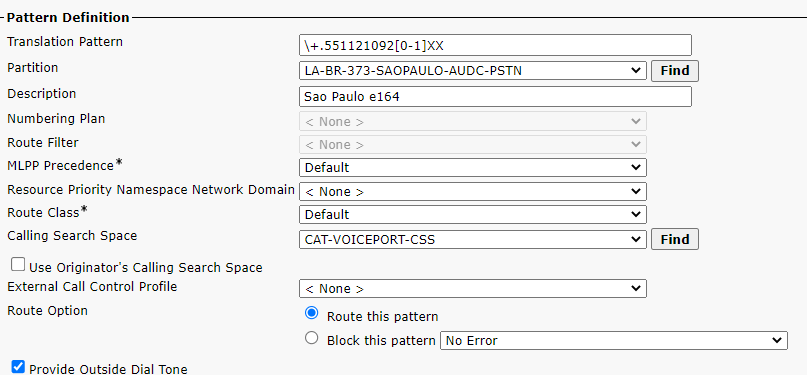
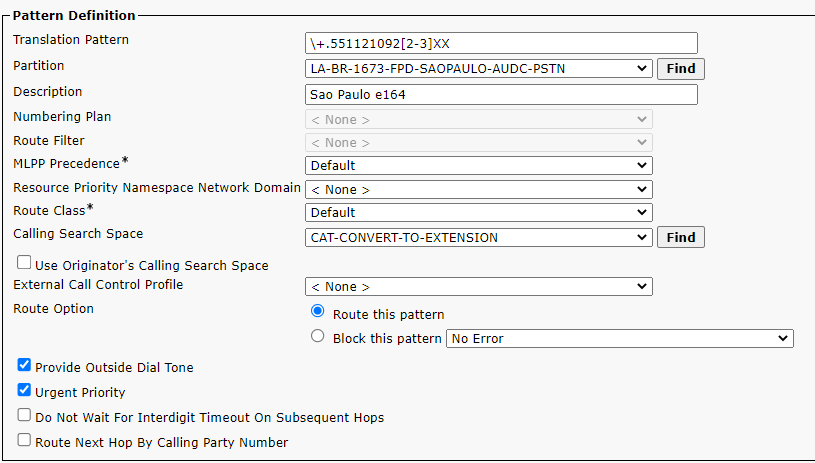
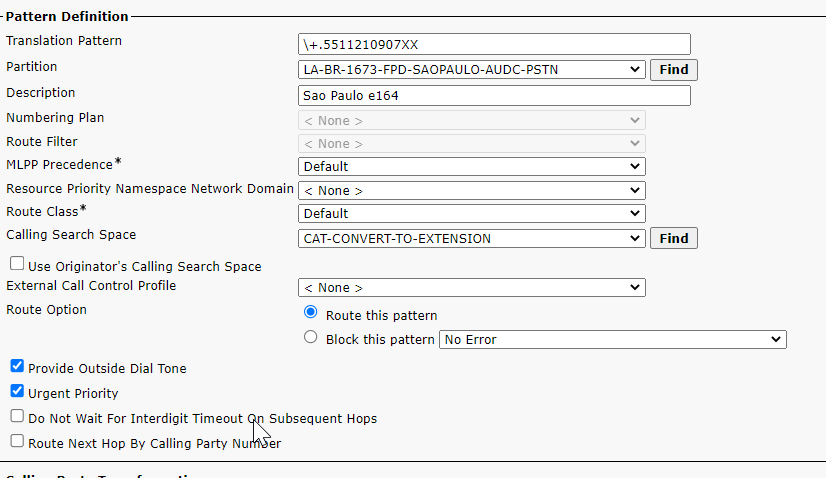
CUCM translation pattern config
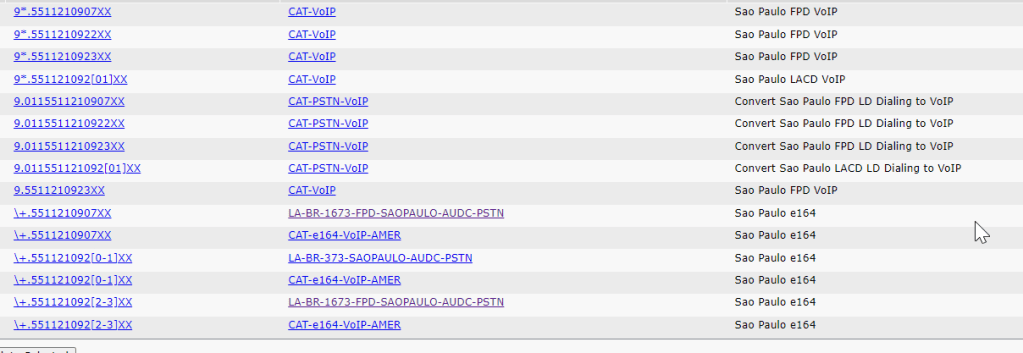
site 373 ranges
site 1673 ranges
sanity check the ranges
\+.551121092[2-3]XX any extension starting 22 or 23 belongs to site 1
\+.551121092[0-1]XX any extension starting 20 or 21 belongs to site 2
Site 2 id 373 test device Cisco
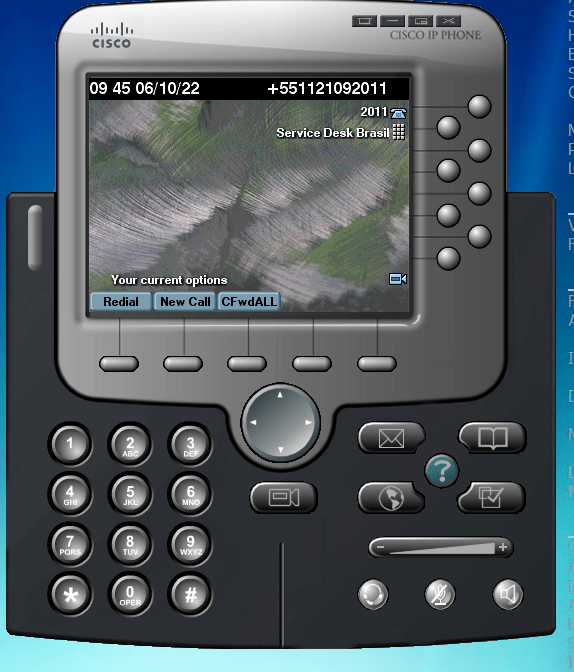
so lets sanity check the 1st pre migration check list which was to test for hybrid working
site 2 id 373 test device TEC
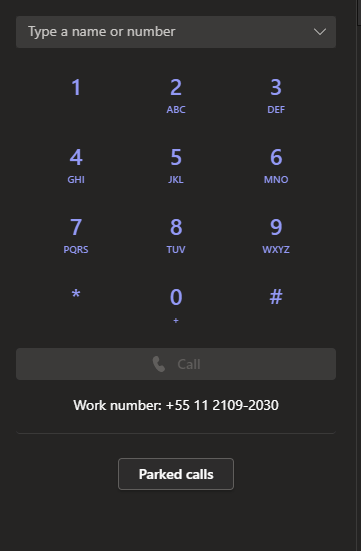
Check the site hybrid functionality – make inbound and outbound calls via cisco and make inbound and outbound calls via teams , test call forwards in both systems any analogue dependencies and IVR functionality dont make any assumptions it will help to understand the dial plan
A genius
inbound call testing site id 373
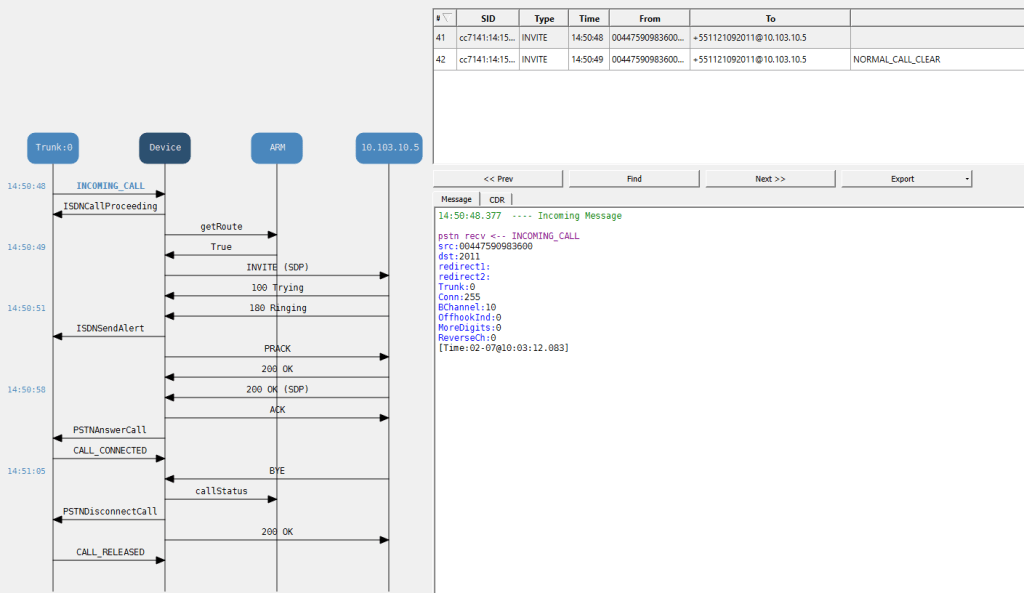
in bound calls got this number cant be recognised
Site 2 id 373 test endpoint TEC
Neither inbound or outbound worked mainly because the normalisations seemed incorrect outbound calls where being prefixed by 0021 and was dropping the + (if you look in the invite below)
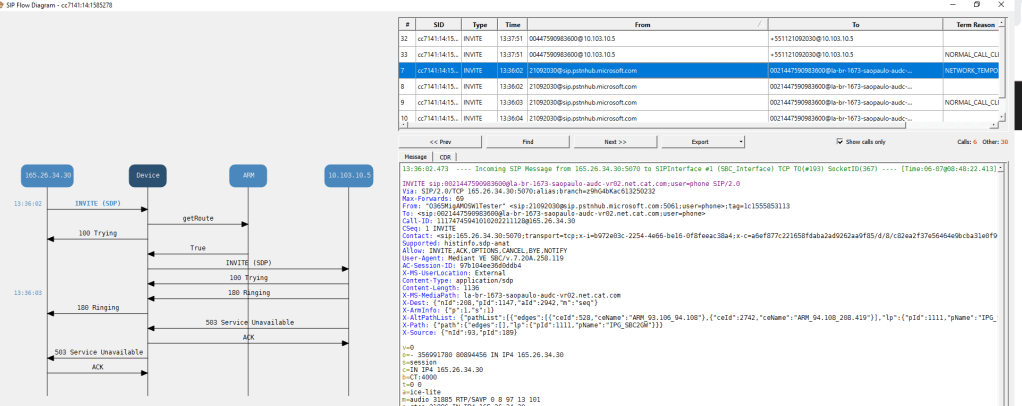
inbound calls got number not in service
Outbound call testing TEC
this worked ok dialing the full e164 pattern within Brazil
Things get interesting
So the site migration check list through up some interesting , that when we put a line in that second range we are hitting an outbound destination manipulation profile that doesnt support e164
outbound dialling from cisco prefixed a +55 which is an easier fix
let break down the teams inbound call
whats puzzling about this is that the site 1 / 1673 / 425 which works perfectly for TEC (id/rnx)
site 2 /373 /422 doesnt and we hit the number not in service annoucement for Cat
The inbound call gets this number in not in service for caterpillar , and this sugests that the pattern may be in CUCM , we see the voice mail kick in on the sdp which i guess is the steve bergstrom voice , but cucms kicking in to say that the number doesnt exist
the outbound call is picking up this prefix 0021 instead of a plus when it tries +44
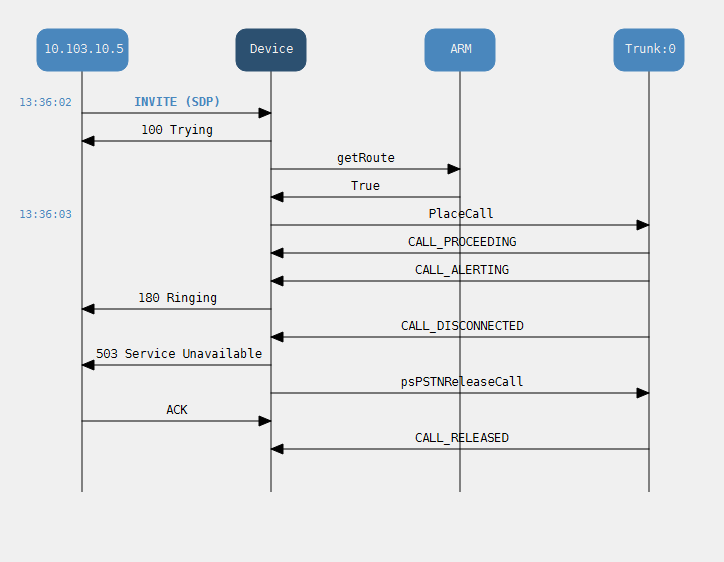
this is what the invite looks like

spot of ARM testing
turns out there is the following manipulations

turns out we could update the table as to whether a site is CBLC or financial
so wheres my prefix come from
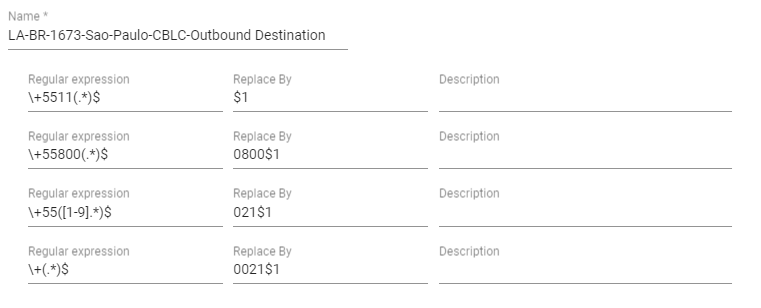
so anything that starts with a plus gets prefixed with the 021
when i tested with my mobile
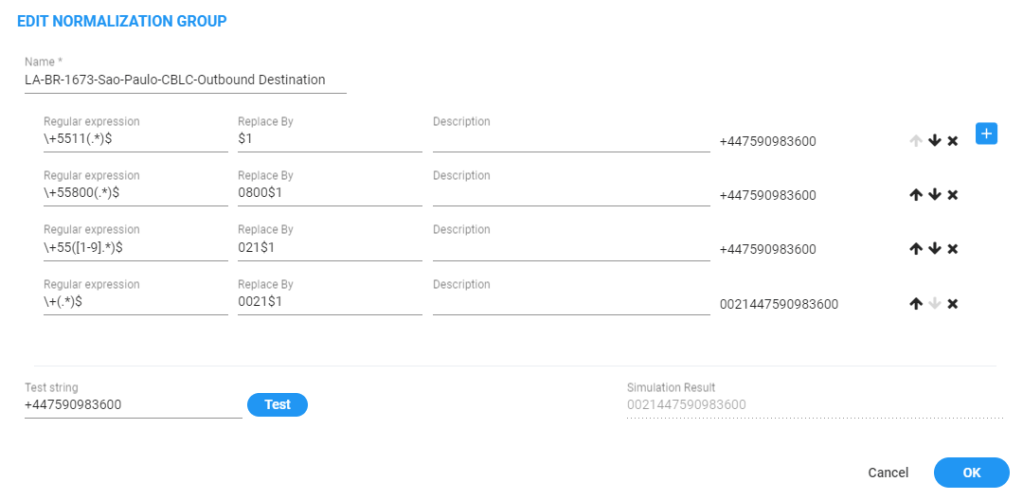
so it should hit the first pattern but its taking the 4th as you can see in the first SIP header

so can i get the 021 from the other normlisation
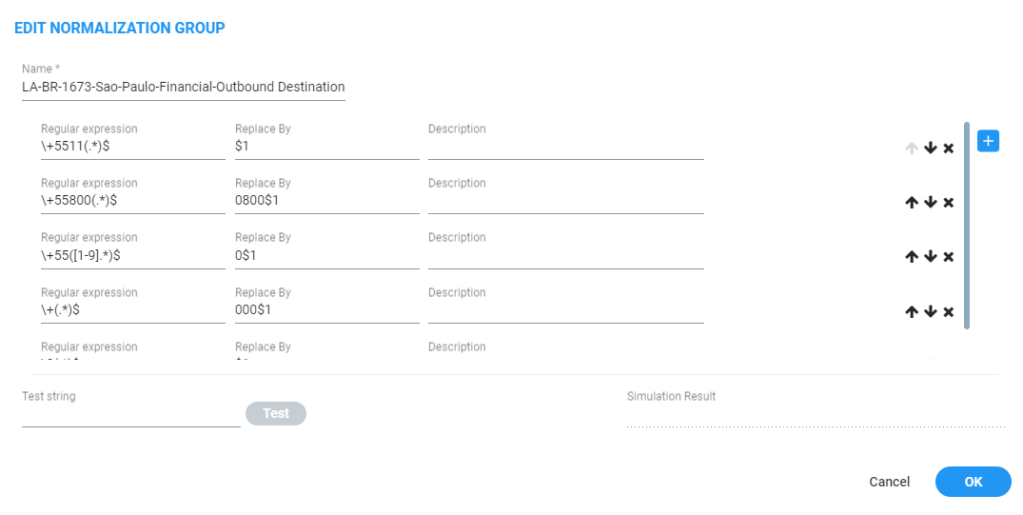
so this normalsation doesnt append but when we test it

The final part of the mystery
there must be a link between the prefix group and the manipulation – which purely depends what digits you put out there
the tale of two routing rules


LA-BR-1673-Sao-Paulo-Financial
SOURCE
Prefix Groups:
Ⓖ LA-BR-1673-Sao-Paulo-Financial
DESTINATION
ADVANCED
Notify when activated:
false
Prioritize call:
false
Registered users:
false
Request type:
Call
Privacy policy:
Transparent
CALL TRIGGER
Initial:
true
Refer:
true
3xx:
true
Broken connection:
true
Fax rerouting:
trueACTIONS
ROUTING
Method:
Sequence
ACTION
Priority: 1
VIP VOIP PRI 2 (la-br-1673-saopaulo-audc-vr01) , Src Man.: LA-BR-1673-Sao-Paulo-Financial-Outbound Source ( From, PAI, PPI ) Dst Man.: LA-BR-1673-Sao-Paulo-Financial-Outbound Destination
Priority: 2
VIP VOIP PRI 1 (la-br-1673-saopaulo-audc-vr01) , Src Man.: LA-BR-1673-Sao-Paulo-Financial-Outbound Source ( From, PAI, PPI ) Dst Man.: LA-BR-1673-Sao-Paulo-Financial-Outbound Destination
drag_indicatorLA-BR-1673-Sao-Paulo-CBLC
LA-BR-1673-Sao-Paulo-CBLC
CONDITIONS
SOURCE
Prefix Groups:
Ⓖ LA-BR-1673-Sao-Paulo-CBLC
DESTINATION
ADVANCED
Notify when activated:
false
Prioritize call:
false
Registered users:
false
Request type:
Call
Privacy policy:
Transparent
CALL TRIGGER
Initial:
true
Refer:
true
3xx:
true
Broken connection:
true
Fax rerouting:
trueACTIONS
ROUTING
Method:
Sequence
ACTION
Priority: 1
Embratel PRI (la-br-1673-saopaulo-audc-vr02) , Src Man.: LA-BR-1673-Sao-Paulo-CBLC-Outbound Source ( From, PAI, PPI ) Dst Man.: LA-BR-1673-Sao-Paulo-CBLC-Outbound Destination
calling restrictions enforced by outbound destination CLBC
what i am hitting is the CLBC translations which for that circuit uses 021 as the trunk access code to dial the e164 pattern
if you dial a number in brazil as the +55 it works but it wouldnt be good to offer , but it was nice to get a connected call
it basically looks like that this call center is not enabled for TEC e164 dialling so we just got to make that work in the outbound and inbound manipulations for CLBC to see how close we can get
Conclusion maybe a week later……..
The list that the lcon gave had users from rnx 424 site 1673 which had already been migrated so that really put the cat amongst the pigeons , but the extension range for these already migrtated users was right for 1673. Inbound and outbound teams calling worked for the site and restrictions where enforced the only thing that didnt work was international outbound but the outbound manipulations where built to just enforce brasil outbounf no where else

 / UCCE / AWS / azure/Security / IP-PBX